Free, private, on-device browser extension

Save supported web video without tracking.

Detect direct HTTPS video files and compatible unencrypted HLS and DASH streams, then save them locally with quality choice, subtitle sidecars, audio-only output, and MP4 progress.

Free · Version 0.6.0 · Released September 4, 2026 · See what changed

Free

No account, no subscription, no ads. Every feature is available to everyone.

High speed

Stream segments are fetched concurrently and retried automatically, so long videos finish fast.

Several files at once

Queue every video detected on a page: MP4, WebM, MOV, and M4V files, plus on-demand HLS and DASH saved as MP4.

Every desktop OS

The same extension on macOS, Windows, Linux, and ChromeOS.

On-device

No developer server, analytics, advertising, or tracking.

Background progress

Downloads continue after the source tab closes, show an ETA, and report clear completion status.

Choose what you need

Pick 720p instead of 4K.

HLS and DASH variants appear in the popup with their available quality and bitrate, so you can choose the right download before it starts.

When HLS provides audio separately, the selected video and audio tracks are merged into one MP4 automatically. Subtitles are saved as a WebVTT file next to the video, and an audio-only rendition can be saved on its own as .m4a.
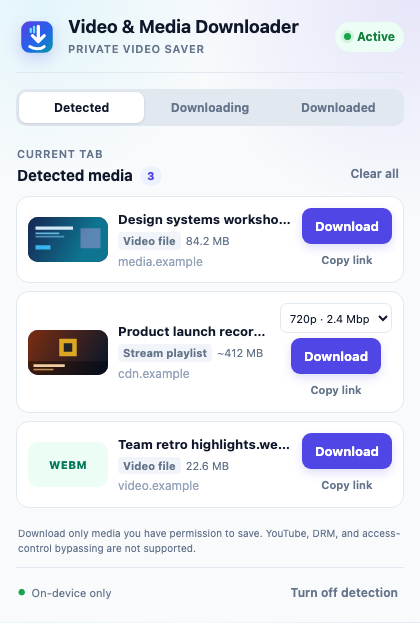
Video & Media Downloader popup showing a 720p quality picker for an HLS stream
The popup keeps the choice simple: select a quality, then download.

Designed for media you may save

YouTube, DRM, encrypted or live streams, paywall bypassing, and access-control bypassing are not supported.

Supported browsers

Changelog

0.6.0 — September 4, 2026 latest

0.5.0 — August 28, 2026

0.4.0 — August 4, 2026

Earlier releases

0.3.2 — August 4, 2026

  • Show an estimated completion time alongside active download progress.
  • Add Open file and Show in folder actions to completion notifications.
  • Support the same Manifest V3 package in Microsoft Edge.

0.3.1 — August 2, 2026

  • Keep one entry per stream rather than one per tab, so a page that embeds several players no longer shows just one of its videos.
  • Detect video files a player fetches in the background, including URLs that carry no file extension.
  • Stop listing a stream's own segments as separate videos.
  • Send the page's referrer when downloading a stream, as direct downloads already did.

0.3.0 — August 1, 2026

  • Detect media as soon as detection is enabled, instead of only after the background worker restarted.
  • Reload the current tab when detection is enabled, since media a page has already requested cannot be observed afterwards.
  • Stop observing media requests immediately when detection is turned off.
  • Retry a stream segment that fails instead of abandoning the download.
  • Fetch stream segments concurrently, which noticeably shortens long streams.
  • Report stream progress on percentage changes, keeping the popup responsive on streams with many segments.
  • Start direct downloads whose URLs carry long signing tokens.
  • Apply the temporary header rule only to the extension's own requests.

0.2.1 — July 31, 2026

  • Rename the extension to Video & Media Downloader.

0.2.0 — July 29, 2026

  • Introduce a consistent icon, popup palette, and store identity.
  • Restrict detection and downloads to HTTPS media.
  • Follow the browser's UI language in English, Spanish, French, German, Brazilian Portuguese, Japanese, Korean, Simplified Chinese, and Traditional Chinese.
  • Expand the permission disclosure to cover all locally handled data.

0.1.1 — July 28, 2026

  • Finalize HLS MP4 duration metadata so downloaded videos report their real duration and expose a seekable timeline.

0.1.0 — July 28, 2026

  • Detect direct video files and HLS/DASH playlists.
  • Save direct files and supported on-demand HLS streams with local progress, cancellation, MP4 transmuxing, and page-title filenames.
  • Continue downloads after the source tab closes and notify on completion.
  • Separate detected, downloading, and downloaded popup views.